- Oct 04 Mon 2010 11:52
-
GIGABYTE 2010 GOOC全球超頻大賽-台北總決賽體驗分享

- Oct 04 Mon 2010 01:09
-
CORSAIR Force SSD 40GB RAID 0 Hi-Speed test in dual PC platform

SSD full name is Solid-State Drive.
It’s new booming hardware within 2 years. It really enhances the PC/NB transfer performance.
The main reason is SSD using NAND Flash instead of diskette design.
- Oct 01 Fri 2010 18:25
-
Overclocking Efficiency of the ECS’ Newest Black Series P55H-AK with 3-way SLI

Several newcomers have entered the motherboard market in recent years,
and thinking back on it, I actually miss the old days of intense competition between all the various motherboard manufacturers.
Nowadays consumers see fewer and fewer choices, many of which belong to the three major motherboard manufacturers.
- Sep 30 Thu 2010 12:51
-
New generation HTPC VGA card - ATI Radeon HD 5570 OC Review

The Radeon HD 5XX0 series is the latest generation of all ATI’s product lines,
the main features of which are using more 3D technology and more advanced process of the chips.
Plus, the product roadmaps of ATI and AMD are quite similar.
The products are all built either with higher C/P rates or with variety of choices for users to make the purchase by their budget easily.
There are several kinds of product lines on the PC market: 5900 / 5800 / 5700 / 5600 / 5500 / 5400,
which brought ATI new series VGA card a very good comment from the market.
I once shared an article about ATI Radeon HD “4670” at the end of 2008,
and it turned out that based on the C/P rate, the model was very popular on the market.
We can see that from the pricing and position of the product, the new generation ATI Radeon “5570” looks like the previous one “4670”,
and also seems “5570” is going to take over the lower cost level of VGA from “4670”.
The particulars of the “5570” are including supporting updated Direct X 11, ATI Eyefinity multi-screen technology and ATI Stream technology.
First, let’s take a look at the externals of ATI Radeon HD 5570, which is built with a smaller short-card design,
means which can be modified with low-profile short bracket, then put into smaller size PC to increase the 3D performance,
although one D-Sub connector could be missing.
From the rear, we can see that there is a metal bracket to hold the heat-spreader on the front side by 4 screws on the rear.
Built-in GDDR3, there are total 8 pcs. of Samsung memory chips on the both sides of the PCB. Frequency is 900Mhz, means it should be DDR3 / 1800.
The total capacity is 1024MB, it should be enough to support most of the usage in any kinds of conditions.
The heat-spreader is so quite during the operation, no noises, copper made looks very pretty.
From the left side, we can see all components “5570” is using, and also with the very dense circuit design.
ATI has a very good standard in using the materials & components from the generic PCB design.
Since AND & ATI were combined several years ago, we can find AMD brand name on ATI products nowadays.
“5570” has built-in D-SUB, DVI & HDMI three different kinds of output connectors.
We can see the ATI “5570” chipset is MADE IN TAIWAN after we removed the heat-spreader.
The heat-spreader is designed with a large copper base to use for heat spreading, and the quality of the thermal paste also looks very good.
The main board I am using for testing is ASROCK 890GX Extreme3, the mean feature is the “True 333 function”,
USB3.0 / SATA 3.0 & E-SATA 3 can be performed at x16 full speed.
In the early stage, the ASROCK 890GX main board is one of the few models which can break out from the limitation of supporting multi-core CPU of the AMD SB850.
South bridge chipset is AMD latest model SB850, which supports 6 x SATA3 devices, including RAID 0, RAID 1, RAID 0+1 & RAID 5.
The North Bridge chipset is AMD 890GX chipset, which is integrated with AMD Radeon HD 4290 VGA chipset.
CPU is designed with V8 + 2 Phase, supports the highest 140W CPU which makes the stability of the entire system much better.
Testing Platform
CPU: AMD Phenom II X2 555 Black Edition
MB: ASROCK 890GX Extreme3
DRAM: CORSAIR DOMINATOR-GT CMD4GX3M2B1600C7
VGA: ATI Radeon HD 5570
HD: CORSAIR CMFSSD-128GBG2D
POWER: be quiet! power4 DELUXE 530W
Cooler: Thermaltake BigTyp14Pro
OS: Windows7 Ultimate 64bit
CPU: 222 X 18 => 3996MHz
DRAM: 1776 CL8 8-8-24 1T
GPU Default 650MHz/900MHz
CINEBENCH R11.5
OpenGL => 36.95 fps
CPU => 4.61 pts
CPU(Single Core) => 1.14 pts
3DMARK2006 => 8481
3DMark Vantage => P4453
CPU SCORE => 13443
GPU SCORE => 3641
GPU OC 745MHz/1133MHz
CINEBENCH R11.5
OpenGL => 44.52 fps
CPU => 4.59 pts
CPU(Single Core) => 1.15 pts
3DMARK2006 => 10007
3DMark Vantage => P5363
CPU SCORE => 13456
GPU SCORE => 4467
The performance of “5570” shows quite good in the stable over clocking range, the over clocking efficiency increases a lot compare with normal.
With 3DMARK2006 & 3DMARK VANTAGE testing programs, the efficiency increase 20% up by 3D games.
GPU Default 650MHz/900MHz
StreetFighter IV Benchmark
1280 X 720 => 110.18FPS
DEVIL MAY CRY4
1280 X 1024 => 94.33/81.35/120.46/67.27 fps
FINAL FANTASY XIV
1920 X 1080 => 2051
GPU OC 745MHz/1133MHz
StreetFighter IV Benchmark
1280 X 720 => 131.18FPS
DEVIL MAY CRY4
1280 X 1024 => 113.98/99.90/145.02/79.52 fps
FINAL FANTASY XIV
1920 X 1080 => 2420
The Radeon HD 5570 has good testing results with the games above, which operates very smoothly even if using the 1920 X 1200 screen resolution.
But if users adjust the 3D effects too high, that might cause a little bit lag in some games,
by this situation, users might need some higher grade VGA cards to work it out.
For the lower-cost level VGA Card, the performance of “5570” is quite well among the 3D effects.
Power Consumption
GPU Default 650MHz/900MHz
System Standby - 102W
GPU Full speed - 151W
GPU OC 745MHz/1133MHz
System Standby - 102W
GPU Full speed - 169W
The default & over clocking settings all have no additional power consumption in standby, the entire PC keeps at around 102W.
When GPU full speed , the over clocking might increase around 18W power consumption, but the efficiency also increases around 20% more,
so the range increased of the power consumption when over clocked is also quite reasonable & acceptable.
Thermal Testing
GPU Default 650MHz/900MHz
System Standby - 50.5
GPU Full speed - 61.0
GPU OC 745MHz/1133MHz
System Standby - 51.5
GPU Full speed - 64.0
The ambient temperature is at 33 degree, no mater with over clocking or with default settings,
the standby temperature shows stable, and it just increases 3 degree when over clocked.
So it should have some help a lot by using 40nm process chipsets to control the thermal for “5570”
The last, it is the one of the hottest 3D games at the moment - StarCraft II : Wings of Liberty
Setting page
GPU Default 650MHz/900MHz
Default - 49
High level settings - 40
GPU OC 745MHz/1133MHz
Default - 62
High level settings - 47
Even we keep the StarCraft II resolution at 1920 X 1200, there is still 30/fps smooth performance,
we recommended not to adjust the 3D effects too high, otherwise it might cause a little bit lag during the game.
But in the high resolution with StarCrafe II, which can still be qualified with the high loading of StarCraft II,
that means the 3D performance of “5570” is still higher than standard.
- Sep 30 Thu 2010 12:37
-
Latest be quiet! Straight Power E7 600W 80+ Bronze Series Review

E7 version of be quiet! Straight Power series is the latest version launched by BQT.
The models from earlier E7 version are 480W, 580W and 680W.
These 3 models are all cable management (CM version) power supplies and surely their prices are a bit higher because of the relatively costly CM design.
Straight Power also has its non-CM version in the market, including 500 and 600W. In terms of selling prices in the market,
their prices are surely a few hundred bucks lower than that of E7 CM version.
The focus of new E7 version launched this time is on 80+ Bronze Certification and the SilentWings FDB fan integrated.
This new series not only is compliant to Rev. 5.0 of Energy Star and the power consumption needed in standby mode is less than 0.5W.
As for its cosmetic part, the point lies in its brand new style.
The case used this time is quite different from be quiet! typical image in our mind. We’ll introduce more of the case in the following section.
Here is our star, Straight Power E7 600W.
The color box design of E7 version, with less different color combinations, looks more elegant.
Contents
Multi-Language User Manual, Cable Ties, Screws, Power Cord.
Straight Power E7 600W Dimensions: 160mm X 150mm X 86mm
The coating is “finger-print resistant”, leaving the case a neat touch.
The titanium gray coating used this time makes this E7 version quite different from the black case we normally see in be quiet! power supply cases.
The honeycomb ventilation holes in the back side, commonly seen design.
Active PFC, 110~240Vac
The symmetric fan guard is in Jazz-Black. Just like what I’ve said before, it looks really like BBQ grill. However, it still looks quite stylish.
12cm FDB Fan: MTBF/300K hrs, 17dBA
The model name of Straight Power E7 600W is "BQT E7-600W"
+12V*4 (45A in total), reaching 540W at most.
3 rows of honeycomb ventilation holes right beside cables, quite helpful in enhancing the heat ventilation mechanism.
Output Cables
1 X 20+4 Pin ATX
1 X 12V P8
1 X 12V P4
1 X 6 Pin VGA
2 X 6+2 Pin VGA
4 X HDD
6 X SATA
1 X FDD
M/B: ASROCK X58 Extreme3, which is the most advanced PC platform among Intel platforms.
Featuring true 333 function, which allows USB 3.0, SATA 3.0 & E-SATA3 to operate at full speed (X16).
Test Platform
CPU: Intel Core i7-930
MB: ASROCK X58 Extreme3
DRAM: CORSAIR DOMINATOR-GT CMG6GX3M3A2000C8
VGA: GIGABYTE GTX260 OC SLI
HD: CORSAIR CMFSSD-128GBG2D RAID 0
POWER: be quiet! Straight Power E7 600W
Cooler: Mega Shadow Deluxe Edition
OS: Windows7 Ultimate 64bit
OS Default Values:
CPU 200 X 21 => 4200MHz
DARM DDR3 1600 CL6 6-6-18 1T
OCCT V3.1.0
In POWER SUPPLY Mode
What listed above is the spec of the platform used in the performance review.
In order to demonstrate the power consumption happens during the test, the consumption will be measured by “Power Angle”.
In OS Desktop window - 222~223W
APFC: PF - 0.97~0.98
Running the Power Supply test items in OCCT
i7-930 OC 4.2GHz, real 4-core along with 4-core HT full-loading simulation and GTX260 SLI 2WAY - 770~811W。
APFC: PF - 0.99
The data obtained through Power Angle is only for reference due to its lack of extreme accuracy.
GTX 260 SLI is used for the review in order to reach the utmost 3D efficiency.
Also, while at full loading, the CPU could reach power consumption as high as up to 811W;
though it was only charged by 110V, still it has reached a level much higher than 600W loading.
OCCT Test Result
CPU Temp. Fluctuation
System Temp. Fluctuation
CPU Voltage Fluctuation
While it’s in standby mode, the voltage stays at around 1.38V, and while the CPU is running at full speed, it stays between 1.36~1.37V.
The voltage fluctuation range of CPU is majorly dominated by the voltage features of M/B.
3.3V
The highest point measured is 3.26V and during the test, it majorly fluctuates between 3.20~3.22V, making the fluctuation ratio around 1.84%.
5V
Falling at the range of 4.93~4.99V; the fluctuation ratio is around 1.20%
12V
The highest point measured is 11.92V and during the test, it majorly fluctuates between 11.19~11.43V, making the fluctuation ratio around 6.12%.
According to the test data released in 80Plus website (at 115V):
The power conversion efficiency of E7 600W is 83.01% and in 80Plus website,
it shows that the actual power converted from 720.20W is 597.86W.
During my test, the peak wattage, 811W, was converted into an effective power of 673.21W (at least 12% higher than the nominal wattage, 600W).
The fluctuation rates of Straight Power E7 600W respectively at 3.3V and 12V are both around 1.9%, making it quite a good performance.
12Vstarts to fluctuate violently after OCCT starts to run at full speed. The fluctuation rate is roughly around 6.12%.
In overloading situation, 12V fluctuated bigger.
The items here are measured by a more accurate meter.
In standby mode:
5V is measured at 5.06V, higher than the 4.99V measured by the M/B.
OCCT running at full speed:
When the voltage range is around 5.12V and OCCT is running at full speed, the voltage measured is higher than those measured in standby mode.
In standby mode:
12V is measured as 11.96V, which is a bit higher than the 11.92V measured by M/B.
OCCT running at full speed:
When the voltage is around 11.67V and OCCT is running at full speed, the voltage measured is 0.29V lower than that measured in standby mode.
Here is the status of 12V when the system is running at full loading
When the system loading is at 600~700W, the voltage displayed by Power Angle is 11.72~11.75V,
when the loading is at 700~800W, the voltage displayed is 11.70~11.72V and when the loading is above
800W, the voltage displayed is 11.67~11.70V.
Based on the data mentioned above, we could realize the 12V performance of E7 600W is still quite stable.
The performance of 5V & 12V are much better than the fluctuation result measured by OCCT along with M/B.
It’s particularly clear while the fluctuation rate of 12V in OCCT is 6.12%, the rate measured by meter is only 2.42%.
Conclusion:
Advantages
1. Artistic color box design of the new E7 version of Straight Power
2. Unique case coating and fan guard design
3. Certified by 80Plus Bronze & Active PFC
4. 100% Japanese capacitors & SilentWings FDB Fan integrated (only 17dBA)
5. 5-year guarantee provided, brand new PSU replacement for RMA within540 days, free RMA receiving/delivery for RMA within 3 years
Disadvantages
1. It would be much better if PCI-E 6 pin could be extended to 4pcs
2. The design would be much better if 12V could be changed to only 1 rail.
Efficiency ★★★★★★★★★☆
Material used ★★★★★★★★☆☆
Spec. ★★★★★★★★☆☆
Appearance ★★★★★★★★★☆
C/P Ratio ★★★★★★★★☆☆
You could still find the advantages of new E7 version in the non-CM series of Straight Power,
such as the honeycomb ventilation holes on both sides, sharp case edges removed to better protect the safety of users.
Of course, the long MTBF and low-noise level of the exclusive SilentWings FDB fan integrated also serve as great advantages
Actually, I haven’t conducted any tests for the part of the wattage higher than it’s nominal spec.
This time, I happened to have a platform capable of running at full loading (over 800W) and it allowed me a great chance to compare the difference.
When the loading was around 770W~810W,
the rpm and CFM of the fan were both increased without making obvious noise and the body temperature of the Power Supply was around 60 Celsius.
In terms of these two aspects, I think you can say the PSU is quite excellent.
In terms of voltage fluctuation, relatively, the fluctuation is much less in 3.3V and 5V.
Though the fluctuation of 12V is a bit higher, after being measured by a meter,
the fluctuation ratio is actually only 2.2%, making itself quite a great point/performance in a 600W PSU loaded a lot above 600W.
The end user price of be quiet! Straight Power E7 600W in the market is around 3,990 NTD, roughly equal to $124 USD.
E7 600W (non-CM version) is around 500NTD lower than E7 580W (CM version) launched to the market earlier.
The two models of new E7 non-CM version (500W & 600W) are capable of increasing the C/P value of E7 version.
So, if an end user is taking non-CM power supply into their consideration while making a purchase,
Straight Power E7 might be quite a good alternative since its C/P value is relatively quite high. : )
- Sep 27 Mon 2010 09:53
-
高效能ITX平台架構解析-Intel Core i5-655K空冷超頻5GHz達成

以往提到ITX平台給人的印象不外乎有這幾點,例如不容易在一般市場買到
或是MB價位較高並且搭配的晶片組是主流的前一兩代產品
還是使用NoteBook CPU腳位或是SO-DIMM腳位設計,容易讓購買ITX平台的花費再往上提升。
今年初Intel發表32nm Core i3/i5 CPU的同時,也推出H55/H57兩種晶片組做為搭配
加上許多MB廠也推出此LGA 1156平台的ITX MB,價位上也較以往ITX MB便宜一些
新規格的ITX MB搭載PC規格CPU、DDR3配備,以至於讓ITX產品的入手較為方便也較為平價。
本篇主要是介紹運用新一代的產品來打造高效能的ITX平台
首先看到的零組件就是CPU,為Intel新推出兩款不鎖頻K系列之一Core i5 655K
左方為產品說明書,右方為655K CPU本體
比較特殊的是655K與875K相同,包裝內並沒有附上散熱器
Intel應該是希望不鎖頻的CPU產品,可以讓消費者自行去選擇散熱能力高的Cooler搭配。
時脈為3.2GHz,支援Turbo Boost技術,最高可達到3.46GHz效能
實體2 Cores並且有Hyper-Threading技術,一共可達到4執行緒,簡稱2C/4T
32nm製程,L3 Cache共有4MB
CPU背面設計經常可以看出每個版本或是系列在設計上的不同
將GPU直接內建於CPU內,時脈為733Mhz
MB搭配GIGABYTE推出的H55N-USB3
2oz純銅電路板、USB 3.0、USB 三倍力電源供應、On/Off Charge功能是其優點
2 X DIMM DDR3,支援800/1066/1333/1600(OC),最高DDR3容量可以支援到8GB
1 X PCI-E X16 支援X16運作,提供使用者在Case內加裝Low Profile VGA擴充
Realtek ALC892,支援7.1聲道與High Definition Audio技術
24 + 4-PIN電源輸入的位置
4 X 藍色SATAII,H55提供,SATA2規格,不支援RAID功能
IO
1 X DVI-D
1 X HDMI
1 X D-SUB
2 X USB 2.0(黃色)
2 X USB 3.0(藍色)
1 X eSATA/USB 2.0共用(黃色)
1 X S/PDIF 光纖輸出
USB 3.0的晶片使用NEC D720200F1
以用料跟規格來看,市場售價約台幣4000元,折合美金127元
由於消費市場可以買到的ITX MB大約只有3款左右,比較後H55N-USB3的C/P值算是相當不錯。
測試平台
CPU: Intel Core i5-655K
MB: GIGABYTE GA-H55N-USB3
DRAM: CORSAIR DOMINATOR CMD8GX3M4A1600C8
VGA: Intel Clarkdale 733MHz
HD: CORSAIR Force SSD 60GB
POWER: Thermaltake ElementQ 220W
Cooler: Intel Cooler
OS: Windows7 Ultimate 64bit
Case方面裝入Thermaltake ElementQ做超頻狀況實測
產品尺寸長寬高 130 x 220 x 330 mm
左方為內附220W SFX PSU,可以安裝2個3.5吋裝置與1個5.25吋裝置
ElementQ的設計主打靜音,不過如果能有系統散熱風扇,對內部的熱對流應該很有幫助
因為H55N-USB3設計位置比較特殊,導致ElementQPower/Reset的線材不夠長無法安裝
雖然MB、CASE都是C/P值很不錯的產品,但消費者在選購此兩款產品做搭配前,需要注意這個細節。
裝機測試中會以先開機再蓋上機殼,再以超頻狀態來測試OC多少的範圍是可以長時間使用
效能測試
CPU 200 X 20 => 4000.4MHz 1.216V
DRAM DDR3 4GB 1600 CL8 8-8-24 1T
GPU 733MHz 64MB
Hyper 4 X PI 32M=> 15m 11.167s
CPUMARK 99 => 626
Nuclearus Multi Core => 15752
Fritz Chess Benchmark => 15.19/7293
CrystalMark 2004R3 => 198722
CINEBENCH R11.5
CPU => 3.36 pts
CPU(Single Core) => 1.35 pts
PCMark Vantage => 15310
將655K OC到4GHz穩定,全速的溫度落在70幾度左右,溫度控制在還算可以接受的範圍
不蓋機殼側板的話,原廠Cooler也可以OC到4.3GHz極穩定,但此時全速溫度會超過90度
個人希望以在機殼內實際做超頻,取得一個穩定度、溫度與效能的平衡點
試了很多超頻組合之後,最後以4GHz來達到在封閉環境內可以長時間使用的時脈
現階段可以想到增加系統整體效能最佳的利器應該就是SSD
搭配CORSAIR FORCE SERIES F40,希望能讓這ITX小主機可以發揮更高的效能
尺寸為2.5吋,代號為F60,最高效能可達到285/275 MB/s
Random 4K寫入效能可達50000 IOPS,大幅改善以往SSD在4K寫入的效能
ATTO DISK Benchmark超過16k以上測試時就達到最高讀取286.1 Mb/s,寫入266.8 MB/s
EVEREST File Benchmark超過512k以上測試時就達到250 MB/s以上的效能
EVEREST Linear Read Average 235.1 MB/s
AS SSD Benchmark
Seq Read - 200.00 MB/s Write - 44.00 MB/s
4K-64Thrd Read - 102.03 MB/s Write - 56.93 MB/s
近期SSD在市價有些許下滑,在產品效能方面也因為控制晶片不同而越來越高
少數高階SSD也已經快接近SATA2的300 MB/s頻寬,未來SATA3普及後會使市場更加熱鬧
ITX平台使用CORSAIR F60讓整體開機速度或是程式、檔案開啟存取的時間可以大幅的縮短。
再來使用開放式平台來測試更高的超頻效能
測試平台
CPU: Intel Core i5-655K
MB: GIGABYTE GA-H55N-USB3
DRAM: CORSAIR DOMINATOR CMD8GX3M4A1600C8
VGA: Intel Clarkdale 733MHz
HD: CORSAIR Force SSD 60GB
POWER: ANTEC Neo ECO 400C
Cooler: Mega Shadow Deluxe Edition
OS: Windows7 Ultimate 64bit
BIOS超頻設定
調整CPU倍頻、時脈與DRAM除頻選項的頁面
超高外頻時,將QPI Clock Ratio改成X44穩定性較佳,效能也不會有明顯的落差
CPU相關技術選項
C1E為省電降頻功能,在CPU使用率不高時,會自動降頻降壓來運作
Intel Turbo Boost與C1E相反,在CPU負載不高時可以再往上加速的技術
DRAM設定頁面,支援X.M.P.自動超頻技術
DDR3參數設定頁面
電壓頁面
Load-Line Calibration
CPU Vcore 0.50000~1.90000V
QPI/Vtt Voltage 1.050~1.990V
GraphicsCore 0.200~1.800V
PCH Core 0.950~1.500V
CPU PLL 1.000~2.580V
DRAM Voltage 1.300~2.600V
比較GIGABYTE Micro ATX H55的BIOS選項,H55N-USB3的BIOS選項數量與電壓範圍一樣豐富。
整體超頻能力也很優秀,可以輕鬆將655K超上到200MHz穩定,Vtt電壓也不需要太高
以上為200/1600穩定的超頻比例,依幾款配備體質不同可以再做微調的動作
此設定值提供給有需要的使用者做為參考
效能測試
CPU 200 X 23 => 4600.4MHz 1.376V
DRAM DDR3 4GB 1600.2 CL8 8-8-24 1T
GPU 733MHz 64MB
Hyper 4 X PI 32M=> 13m 46.692s
CPUMARK 99 => 718
Nuclearus Multi Core => 18083
Fritz Chess Benchmark => 17.136/8333
CrystalMark 2004R3 => 217668
CINEBENCH R11.5
CPU => 3.83 pts
CPU(Single Core) => 1.55 pts
PCMark Vantage => 15924
改裝高階CPU散熱器後,超頻到4.6GHz通過各種測試不是大問題,直接提升10~15%左右的效能
655K因為是2 Cores,在超頻範圍比起4或6 Cores CPU還要高,先前分享過的660/661也可以達到4.6GHz。
當然這一部份也歸功於導入32nm製程之後,更有效降低發熱量、降低耗電量並同時拉高CPU時脈
DRAM頻寬測試 - DDR3 1600 CL8 8-8-24 1T
CPU OC 4GHz
Sandra Memory Bandwidth - 15180 MB/s
EVEREST Memory Read - 12050 MB/s
CPU OC 4.6GHz
Sandra Memory Bandwidth - 15232 MB/s
EVEREST Memory Read - 12125 MB/s
可以由以上的測試看到不同的方面,655K新架構不同於以往的Core 2 Duo架構特性
以往LGA 775的平台會依CPU時脈越高,同時也會提升到DRAM的頻寬
LGA 1156平台把Memory Controller內建在CPU內,此時CPU時脈高低,DRAM效能沒有太大差異。
不過也因為這種設計,LGA 1156基本的DRAM頻寬也比LGA 775高上2~3成左右
這是LGA 775平台把CPU時脈拉到再高,也很難追上LGA 1156的DDR3頻寬
溫度表現
系統待機時 - 40~41
CPU全速時 - 71~73
Intel Burn Test v2.4,Stress Level Maximum
待機時的溫度不高,全速溫度到73也在可以接受的範圍內
使用這樣的散熱器等級,如果安裝在機殼內,CPU溫度會再提升一點
但還是可以讓使用者在長時間使用的允許溫度範圍內
耗電量測試
CPU 4GHz
系統待機時 - 62W
CPU全速時 - 100W
CPU 4.6GHz
系統待機時 - 68W
CPU全速時 - 130W
超頻到4G或4.6G時,待機的耗電量都很低,不超過70W
全速時落差較大,不過最高也落在130W左右,算是相當省電的平台
如果CPU在預設值3.2GHz的話,待機與全速耗電量相信會更低上許多
最後就是把CPU電壓加到1.488V,655K空冷依然可以達到5GHz高時脈
CPUZ官網認證
Intel Core i5 655K OC 5G / windwithme
今年一月時小弟將Core i5-660/661兩款CPU OC到5GHz後,現在使用655K照常可以達到空冷5GHz
而且655K在5GHz進入OS桌面的電壓又更低,只需要1.488V,可見得Intel在CPU良率上也有所進步。
自從Intel在2010年初推出LGA 1156新的架構後,以2 Cores CPU加上內建GPU的功能
讓ITX的市場在價位、效能與市場有了新的選擇,CPU可以搭配的系列也相當豐富
分別有Core i3-530/540、Core i5-650/660/661/670/655K等數種組合
價位方面也可以依消費者的預算來選擇,這方面選購彈性增大許多
MB方面在年初有DFI LANPARTY MI P55-T36上市,前幾個月有ECS H55H-I推出
到這次測試中的GIGABYTE GA-H55N-USB3,這三款ITX MB也都打破以往此類產品的印象。
全部強調與超頻能力、豐富的BIOS選項,使用起來的效能不輸Micro ATX或ATX的MB
近年來不管是NooteBook或是Desktop PC都有體積越來越小的趨勢
像是PC方面,以前一般尺寸使用ATX,想要使用小尺寸的主機直接會想到改用Micro ATX的規格。
這兩年MB產品又往更小尺寸ITX邁進,許多MB廠也開始推出不少相關產品
在加上Intel主推一系列的Core i3/i5 CPU,32nm製程與內建GPU技術
讓這一年來,ITX的能見度有些許提高,希望未來ITX產品可以越來越普及,各家品牌都可以加入競爭。
讓消費者可以在一般消費市場選購體積更小的PC,節省居家空間外也可以兼顧到PC效能 :)
- Sep 20 Mon 2010 10:15
-
風系列相機開箱-Canon IXUS 200IS彩虹公司貨外觀心得分享

- Sep 19 Sun 2010 18:33
-
具備機身防手震SR之DSLR-Pentax K10D入手初體驗(2007年復刻文)
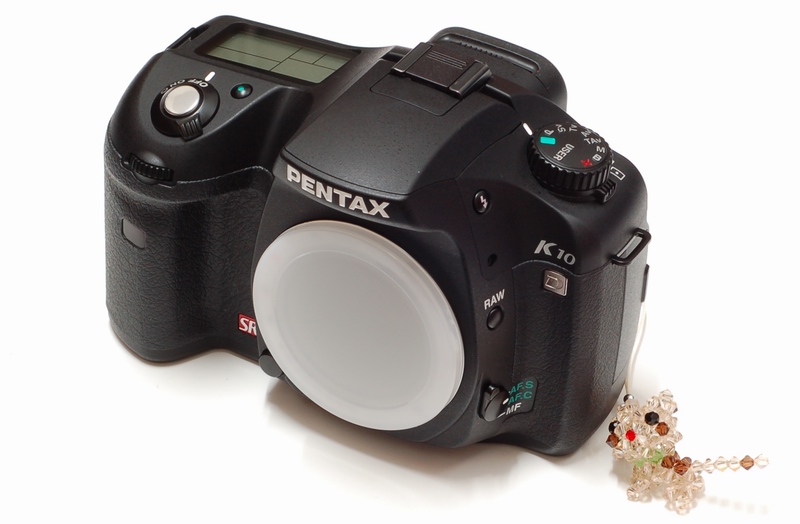
個人愛用之入門機款Nikon D50也將近快一年
在這一年中,D50陪我拍過無數電腦產品測試文章
一直很喜歡它的銳利度.色澤與對焦速度
不過隨著2006下半DSLR進入戰國時代,9~11點對焦.2.5吋LCD與千萬畫素的普及
讓小弟對於升級機身的聲音開始越來越大
照慣例,個人依然花時間做機身選購的一些功課
鎖定購入機種主要在Nikon D80與最近Pentax剛推出新款產品,相當火熱的K10D
D80已經推出快三個月,網路上許多討論與畫質測試依然相當出色,功能也比D50強了不少
最重要的除了長期習慣使用Nikon系統外,還有D50使用的三顆鏡頭與SB800還可以使用
K10D除了價格比D80較高一些,勝在機身質感佳,加上內建防手震等等功能
機身規格比其相近等級之Canon 30D與Nikon D80好上一些
考慮很久加上好不容易可以訂到K10D,就馬上出清了Nikon配備
準備進入Pentax世界探究一番
12/15冒著大雨直接衝去台北水貨名店購買
K10D限量與機身規格魅力迷人之因,當時現場共有四位在購買K10D
順便再幫朋友加訂一台外
回到家後,馬上使用D50拍攝K10D相關照片
K10D靠它躲雨平安到家的塑膠袋?!
黑色外包裝,紙盒印刷蠻容易掉漆的
如果改個亮色系的圖案與加厚外箱紙板厚度,質感會比較理想
內部附件
K10D英文說明書.獨家影像軟體與使用說明書
店家一年保固卡
購買水貨的消費者,建議選擇口碑好.售後服務佳的水貨店家
充電器.背帶.傳輸線.影像線材與店家附的台灣區電源轉接頭
(此版本K10D應該為美歐版本)
使用之鋰電池
非Pentax先前愛用的3號電池
7.4v 1620mAh
贈送的簡易清潔組.螢幕保護貼
與400元台幣的MINOLTA副廠電池,外觀與D-LI50一模一樣
K10D機身本體
K10D右前方,有大大的防手震SR標誌
K10D機身右後方
功能齊全的各式按鈕與轉盤
使用的記憶卡為SD規格
K10D機身左後方
模式轉盤與主要選單按鈕
最左邊是影像輸出與電源輸入
K10D機身底部
左方為電池置放處
不同處在於記憶卡與電池放入時都需要轉開一個開關鈕
有好也好壞,好處是比較穩固,壞處是比較不方便.還有經常開關下,按鈕耐用度的問題
K10D機身上方
左邊為頂點LCD,形狀不是正四方型,有點奇怪,保護貼裁切也較麻煩
提供的資訊相當充足
接合鏡頭後全貌
手邊可以使用的鏡頭
Pentax FA 50mm F1.4
Pentax 16-45mm F4
這次拍攝K10D機身照片的D50
也是長久以來辛苦的大功臣
K10D入手到現在沒有超過兩天整
很多功能都還在摸索,特性可能也無法掌握
依先前使用DSLR的經驗,拍幾張照片與心得分享一下
以下照片清析度+1/EV+0.5
首先是隨手拍
局部裁圖縮小
ISO 400 1/6s 關SR
ISO 400 1/6s 開SR
原圖大小裁切
關SR
開SR
ISO400 1/6s 關SR
局部裁圖縮小
ISO400 1/6s 開SR
原圖大小裁切
關SR
開SR
自動白平衡方面
在一樣的設定,拉近拍小東西
使用全白色的底,常會有色溫不準的狀況
狀況A
狀況B
居家風景隨拍
ISO100 清析度+1/EV+0.5
20mm端
45mm端
放晴的星期日
先前看過不少其他國家網站的評測或是樣本照片
覺得色澤接近原色,細部也比其他廠還多,這是Pentax優點
不過畫質偏軟也是大多測試K10D文章可以發現的事實
這幾天再次dpreview補完K10D測試
做了D80/30D/K10D在自家50mm F1.4鏡頭規格詳細比較
可以看到的是,K10D JPEG模式拍起來相當的軟,與各廠幾乎無法比較
不過RAW檔水準就可與其他家比美
雖然使用時間很短,鏡頭也不全面
還是以Nikon D50使用經驗與這兩天K10D使用過程來評論
Pentax K10D
優點
1.機身質感佳,金屬機身.皮革覆蓋範圍也廣
2.觀景窗視野非常明亮,LCD色澤與可視角表現也佳
3.照片成象色澤自然柔和,細節表現出色
4.機身按鈕與功能選單,已經有中階級水準,與其他廠比毫不遜色
5.內建機身防手震功能,目前只有SONY也開放這技術在機身上
6.價格競爭力夠,以1000美金上下的價格,比之同級的D80/30D都擁有較高的C/P值
缺點
1.JPG畫質偏軟,加銳利度1~2也沒有太大幫助
2.自動白平衡在某些特定場合容易出錯
3.對焦速度偏慢,尤其在暗處更容易發生對不到焦的狀況
4.細節較多,但是ISO400以上就有部份雜訊,ISO800時更多...
5.K100D上市後,熱門鏡頭時常缺貨
6.改成RAW之後雖然畫質變好,但是檔案比起別家來得大許多
雖然大家不斷的在討論,千萬畫素相機需要好一些的鏡頭才能發揮水準
相信此次個人使用的兩顆鏡頭也非入門等級,何況Pentax原廠拿18-55做為K10D Kit搭配
今天不是要求K10D跟它廠一樣高ISO純淨或者高銳利度
但在基本的銳利度表現,比起其他廠的千萬畫素或是所有的六百萬DSLR,都是很弱的
測試使用JPG拍照,壓縮比有些點,檔案算蠻小的
有空時會補上RAW或是LE鏡的測試
愛之深,責之切
不管如何,K10D還是目前市面上1000美金上下,C/P值最高的機身,期待它有更好的表現
更期待Pentax能更新軔體,改善一些不完善
windwithme並非專業攝影師,也非我的專長
只是愛好拍照的一般使用者
此篇初體驗心得只是代表一個入門玩家的心得:)
在對焦速度.測光準確度無法讓原先熟悉N家的小弟滿意,另外還有一點就是JPEG畫質過軟
相信很多人也期待K10D在畫質上有更好的表現,試拍三天後,小弟決定回去使用Nikon系統
- Sep 14 Tue 2010 12:33
-
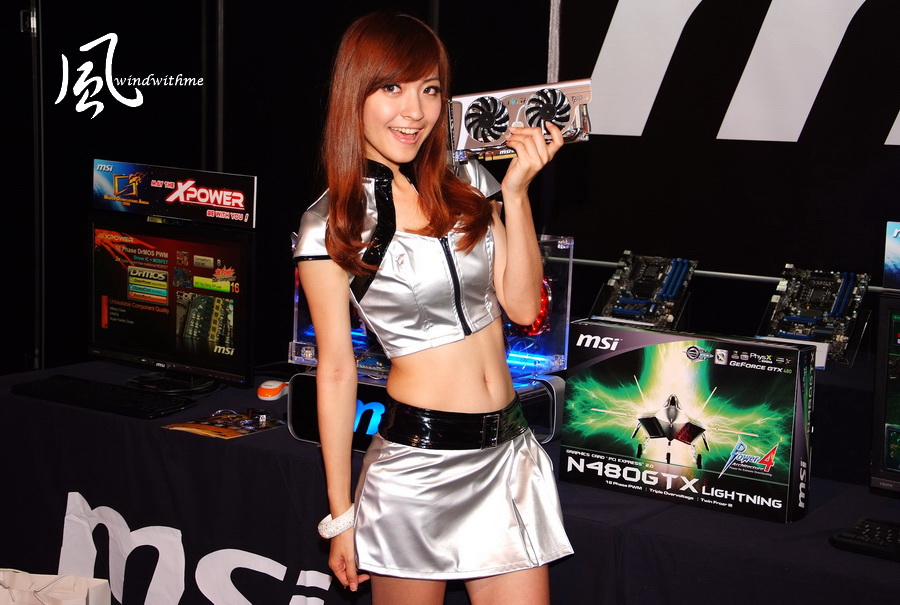
MSI 2010 MOA全球超頻大賽-台北總決賽體驗分享
- Sep 13 Mon 2010 15:22
-
CORSAIR Force SSD 40GB搭載PC雙平台之Raid0高速實測

SSD英文全名為Solid-State Drive,中文名稱為固態硬碟
這是屬於近兩年才新興的硬體,對於PC/NB系統傳輸的效能有很大的提升
主因是SSD擺脫傳統硬碟以碟片設計的方式,直接以NAND Flash為設計概念的新世代產品。
SSD比較常見的容量有32/40/64/80/128GB這幾種規格,觀察近期SSD市場價位有些許下降。
- Aug 23 Mon 2010 11:46
-
ECS最新Black系列高階P55H-AK搭載SLI 3WAY超頻效能解析
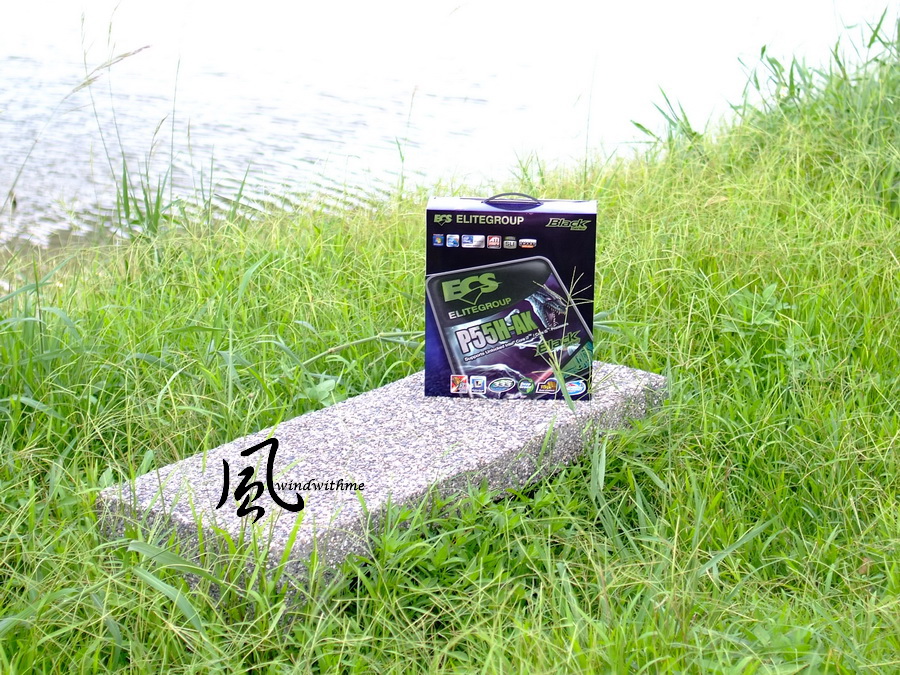
最近幾年退出MB市場的品牌又多了幾家,仔細想想還蠻懷念以前MB品牌百家爭鳴的時代
反觀現在消費者可以選擇的MB品牌越來越少,通路上很多都是以三大MB廠為主的產品
相對地,MB價位感覺上也越來越高,如果能有更多的MB品牌可以在市場上競爭,對消費者較為有利。
ECS從今年又回歸到台灣市場,在MB新品發表方面近來有很多的曝光動作
身為全球前三大MB銷售量的常客,ECS給人的印象就是平價、代工的產品路線
現在的ECS也開始往高效能或超頻領域進軍,為高階MB品牌多增加一個選擇
Intel對於LGA 1156規格的P55晶片組,一直以來都是定位在中高階的消費市場
規格與老大哥LGA 1366對比,P55少了SLI支援、多工下PCI-E高頻寬、DDR3三通道等技術
不過有些MB品牌在高階P55產品,會以外接晶片加強P55在先天上某些不足之處
此回入手的ECS P55H-AK也是市場上少數擁有高規格的P55產品,以下會有更詳細的介紹。
首先看到P55H-AK全貌,使用少見的黑、灰、灰藍三種配色
外觀不同於其他品牌的MB產品,在顏色搭配上,因為色系相近,有沉穩感卻不會顯得太突兀。
內附配件
英文說明書、簡易安裝手冊、驅動軟體CD、前置USB 3.0 Port
SATA線材、2~3WAY SLI橋接器
主機板左下方
3 X PCI-E Gen 2.0 X16,支援3Way CrossFireX與SLI技術,頻寬為X16+X8+X8
2 X PCI-E X1
1 X PCI
Realtek RTL8111E雙網路晶片,支援Teaming
Realtek ALC889音效晶片,支援8聲道與High Definition Audio技術
主機板右下方
6 X 白色SATAII,P55提供,SATA2規格,支援 RAID 0, RAID 1,RAID 5及RAID 10
2 X 灰色SATAIII,Marvell 9128晶片提供,SATA3規格,支援 RAID 0,RAID 1
左上為外接USB 3.0 Port接口,Power、Reset按鈕,內建Debug LED
主機板右上
4 X DIMM DDR3,支援1066/1333/1600/1800(OC)/2000(OC)/2200(OC)/2400(OC),DDR3最高容量支援到16GB。
DDR3 1800以上的規格需要配合超頻才可以達成,旁邊為24-PIN電源輸入
主機板左上
LGA 1156 CPU安裝處
CPU針腳使用15μ的黃金接點,可提供 3 倍額外的抗氧化性、耐熱性以及耐刮性
P55H-AK採用12+2相供電,屬於市場上高階的P55供電設計。
IO
clr CMOS按鈕
8 X USB 2.0(紅/黑色)
2 X USB 3.0(藍色)
2 X eSATA/USB 2.0共用紅色)
2 X RJ-45網路孔
1 X S/PDIF
USB 3.0的晶片採用NEC D720200F1
第二顆USB 3.0的晶片,為前置USB Port所設計
MB南橋處為Intel P55晶片,為Intel南北橋合一的單晶片設計
下方的銀色散熱片為PLX PEX 8608,增加PCI-E的頻寬,讓SATA3、USB 3.0獲得更高的頻寬
MB北橋處為NVIDIA nForce200,主要功能為提升PCI-E頻寬與支援2~3WAY SLI技術
Black Series是ECS高階的MB產品定位,Qooltech III設計的雙熱導管散熱模組
開機畫面
BIOS主要頁面
M.I.B X調整時脈.參數與電壓的功能
頁面中可以調整的有CPU倍頻、CPU/DRAM除頻、DRAM參數
更詳細的DRAM參數、CPU外頻調整與其他超頻功能
電壓頁面
CPU Core Voltage -0.900~+0.945V
CPU VTT Voltage -0.800~+0.630V
DRAM Voltage -0.800~+0.630V
PCH Voltage -0.800~+0.630V
提供兩組存檔,讓使用者可以將自己的超頻設定存入
CPU相關技術選項
C1E為省電降頻功能,在CPU使用率不高時,會自動降頻降壓來運作
PC Health Status
P55H-AK在BIOS中電壓與選項數量都還算不錯,如果電壓選項可以多一點會更佳
以上是小弟使用CPU/DDR3比例為210/1682的設定值,若有體質不錯或是類似硬體組合的消費者可以參考以上的設定值。
希望對於超頻有需求的網友會有所幫助
測試平台
CPU: Intel Core i7-875K
MB: ECS Black Series P55H-AK
DRAM: CORSAIR DOMINATOR-GT CMG4GX3M2A2000C8
VGA: GIGABYTE GTX260 OC SLI 3WAY
HD: Intel X25-V 40GB RAID 0
POWER: CORSAIR TX950W
Cooler: Mega Shadow Deluxe Edition
OS: Windows7 Ultimate 64bit
eBLU是一種線上更新的BIOS軟體,是現在較為常見的MB附加軟體
eOC為超頻軟體,在OS下可以設定電壓、外頻,提供較快速的超頻功能
此軟體同時也可以看到MB目前的狀態
CPU搭配Intel Core i7-875K
時脈為2.93GHz,支援Turbo Boost技術,最高可達到3.6GHz效能
實體4 Cores並且有Hyper-Threading技術,一共可達到8執行緒,簡稱4C/8T
45nm製程,L3 Cache共有8MB,以上都是目前LGA 1156平台的最頂級CPU規格
超頻設定
CPU 210 X 21 => 4200MHz 1.308V
DDR3 1680 CL8 8-8-24 1T
Hyper PI 32M X8=> 14m 35.068s
CPUMARK 99=> 652
CrystalMark 2004R3 => 285653
CINEBENCH R11.5
CPU => 7.13 pts
CPU(Single Core) => 1.43 pts
PCMark Vantage => 16381
P55H-AK將CPU超頻到4.2GHz通過多種軟體穩定測試,所需要的電壓比起其他大品牌的P55來說幾乎差不多
搭配i7 875K外頻可以達到210MHz穩定,以P55的等級來說也有很不錯的表現
CPU電壓方面,在待機只能有預設電壓的數據,全速才可以達到使用者BIOS內設定的電壓值
對於較大幅度的超頻動作時,還是會有些許的影響,希望ECS日後可以在這方面做改善。
DRAM效能測試
DDR3 1680 CL8 8-8-24 1T
Sandra Memory Bandwidth - 21889 MB/s
EVEREST Memory Read - 20980 MB/s
DDR3 2000 CL9 9-9-24 1T
Sandra Memory Bandwidth - 25067 MB/s
EVEREST Memory Read - 21868 MB/s
DDR3的頻寬測試優於其他品牌的P55 MB,也許是預設值參數較緊或是原廠調效較佳的原因
P55H-AK的DDR3頻寬表現,已經與LGA 1366的三通道的頻寬測試結果差不多優秀
3D效能測試
測試中使用三張GTX 260,P55H-AK是少數支援到NVIDIA SLI 3WAY的P55產品
3DMark Vantage => P28536
CPU SCORE => 52795
GPU SCORE => 24746
StreetFighter IV Benchmark
1920 X 1200 8XAA => 132.97FPS
DEVIL MAY CRY4
DX10 1600 X 1200 8XAA => 109.63/97.68/108.19/125.07 fps
FINAL FANTASY XIV
1920 X 1080 => 4008
StarCraft II 星海爭霸II:自由之翼
選項設定等級高 - 62
LOST PLANET 2
DX9 1920 X 1200 TEST A - 44.9 fps
DX9 1920 X 1200 TEST A - 40.1 fps
3DMark Vantage、FINAL FANTASY XIV這兩款軟體有支援到SLI 3WAY,數據比單張GTX260時效能高上許多。
不過其他GAME的測試結果,因為軟體支援SLI優化不夠好,導致數據並沒有發揮SLI該有的效能
對於許多GAME軟體來說,不止是對於GPU SLI/CF支援度問題,對於4 Cores以上的CPU支援度也有很大的改進空間。
ECS Black Series P55H-AK
優點
1.市場上少見的高階P55 MB產品,外觀配色與產品包裝都兼具質感
2.內建NVIDIA NF200晶片,3D擴充性達到3WAY NVIDIA SLI / ATi CrossfireX
3.搭載最新的USB 3.0與SATA3晶片,提升MB傳輸介面最高的頻寬
4.增加PLX PEX 8608晶片,增加PCI-E的整體頻寬
5.DDR3頻寬效能較高,CPU外頻超頻範圍優秀
缺點
1.CPU待機時電壓值為預設值
2.DDR3 2000以上的穩定度還有改善的空間
3.USB 3.0的效能偶爾會有低落的問題
效能比 ★★★★★★★★☆☆
用料比 ★★★★★★★★★☆
規格比 ★★★★★★★★★☆
外觀比 ★★★★★★★★☆☆
性價比 ★★★★★★★☆☆☆
LGA 1156的P55晶片組所搭配的理想CPU,共有i5 750/760、i7 860/870/875K等等
Intel在近期的一波CPU調降後,讓這個平台的C/P值比起最高階X58還要再提高一些
加上各家MB廠在市場上都推出相當多款的P55 MB產品讓消費者做選擇
價位從最低台幣約3500元,折合美金約110元,到最高台幣約10500元,折合美金約330元
建議選購LGA 1156前可以依照預算,來選擇符合自己需求的P55 MB產品
P55H-AK在設計與用料上都有著不輸三大MB品牌的水準,這方面值得肯定
對於市場售價大約落在台幣9500元左右,折合美金約298元左右,屬於高階P55 MB的售價
如果能再壓低一些價格,相信會再拉高C/P值,也可以增加更多的消費者接受度
由於ECS進入高階超頻產品的領域不算長,MB產品還有些細節可以去做到更好
例如可以把BIOS的選項開得更豐富,或是加強BIOS在極限超頻後的穩定度,應該會有更高水準的表現
ECS身為全球MB出貨量的大廠之一,如果能在高階、超頻產品有所斬獲,就可以建立更好的品牌形象
對於在選購MB產品時,許多消費者若想在三大品牌之外多一個可以選擇的品牌,ECS也是一個可以列入考慮的品牌。
希望未來在高階產品的領域,像是X58改版或是未來的P67晶片組,ECS都可以推出更強更優秀的產品 :)
- Aug 12 Thu 2010 15:03
-
AMD瘋VISION行動車-光華商場體驗發表會

印象中小弟在逛台北光華商場時,偶爾會看到旁邊有許多知名品牌的廠商在辦活動
目的是為自家新產品或新技術做推銷的動作,讓許多來光華商場採購的電腦消費者更了解市場新知
AMD VISION新技術的平台是AMD這幾個月主推的規格
在DeskTop或是NoteBook的領域上未來會有更多的產品掛上VISION認證標籤
VISION主要是視覺效果為主的技術,例如高畫質視覺享受、藍光ATI Avivo高解析技術、ATI Stream解碼技術。
以下是AMD於8/2 光華商場舉辦VISION行動車體驗會的活動照片
主持人請來網路當紅的虎牙妹
以下就請來AMD幾位重要的高層或是合作夥伴來講說AMD最新產品技術、市場狀況與未來展望
ATI Eyefinity多螢幕輸出技術也是主打的項目之一,會場有提供五螢幕的AMD平台讓消費者體驗
讓光華商場的消費者參加VISION體驗活動,兌換相關贈品處
AMD VISION行動車剪綵活動
VISION行動車後續會在全台走透透,推廣AMD VISION新平台的優勢
AMD與會相關高層人士與活動全體Sohw Girl合照
行動車內部,有搭載VISION技術的PC與NB產品提供體驗
最後是活動的一些花絮照片
以上是小弟windwitme在現場拍攝的活動內容,提供給有興趣的網友參考,謝謝 :)
